
Tool Review: Akiflow - The Productivity Tool
A personal command center that pulls Slack, Jira, Gmail, GitHub and Notion into one inbox and calendar. Worth the switching cost?
What is Akiflow?
Akiflow is a personal command center that consolidates all your inputs (Slack, Jira, Gmail, GitHub, Notion) into a single universal inbox and calendar.
It acts as an abstraction layer over your existing tools, allowing you to capture, process, and time-block tasks without constantly context-switching between tabs.

Productivity Tool
Akiflow is a premier productivity tool tailored for the modern CTO. To effectively juggle complex responsibilities, you need a solution designed to maximize efficiency and streamline your workflow.
Why is it interesting?
Akiflow offers a “universal inbox”: It aggregates notifications and tasks from your entire tech stack via API. A starred Slack message, a labeled email, or an assigned Jira issue all land in one list.
It integrates with your calendar and allows for “Time Blocking”, which is one of the main tools as a CTO to efficiently manage your time:
How does it work in practice?
After installing Akiflow, it took about 10 minutes to link the necessary apps (Slack, Jira, Gmail). The integrations work fast and bi-directional. They are limited somewhat in how far they can go e.g.
- Slack: Only “Save Later” messages will arrive in the inbox
- Gmail: Only “Starred” messages will arrive in the inbox. Alternatively you can label the mail with “Akiflow”
- Jira: Only new issues with a specific status and assignee are possible. JQL is not supported
Overall the promise of “universal inbox” works. This by itself is a time saver 🤩 .
Adding new tasks
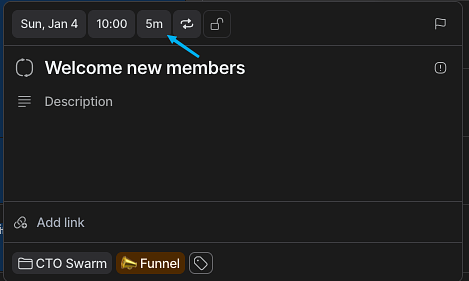
The task interface allows for precise time management, enabling you to plan execution dates, set specific durations, and configure recurring schedules directly from the header. Tasks act as context-rich containers where you can add detailed descriptions and attach external links, ensuring all necessary reference material “links” linked with the to-do item. You can further organize your workload by assigning “Projects”, customizable tags.
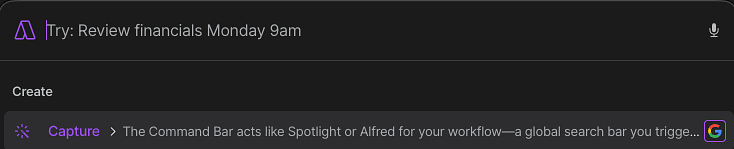
Using the command bar
The Command Bar acts like Spotlight or Alfred for your workflow—a global search bar you trigger with a keyboard shortcut from anywhere on your computer. It allows you to instantly capture tasks, join upcoming meetings, or propose available time slots without ever touching your mouse or leaving your current window.

You can also capture tasks on the fly by texting Aki, Akiflow's AI assistant. Simply send a message like "Add 'fetch the milk' and do it by next Sunday," and Aki uses natural language processing to instantly create the task with the correct due date.
Linking todo’s to the calendar
The most direct way to time block in Akiflow is by moving tasks from your Inbox or "Today" list directly onto the calendar grid.
- Select a Task: Locate a task in your Inbox (left-hand panel).
- Drag to Calendar: Click and hold the task, then drag it onto the calendar view on the right.
- Set Duration: Drop the task into a specific time slot (e.g., 2:00 PM – 3:00 PM). You can immediately click and drag the bottom edge of the event to adjust the duration (e.g., extend it to 2 hours).
- Result: The task now exists as a calendar event on your linked calendar (like Google Calendar or Outlook), ensuring you don't get double-booked by colleagues.
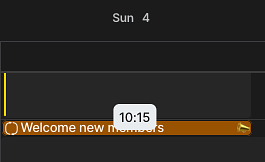
In this case i have planned my “Welcome new members” block for Sunday 4th at 10:00.
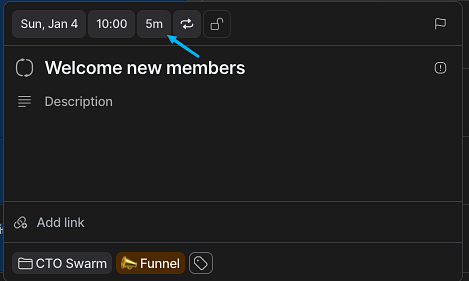
Based on the duration of the task, Akiflow automatically sets the correct length of the block in the calendar.
Pricing
Akiflow is priced significantly higher than standard to-do apps, costing $34 per month (monthly billing) or $19 per month (annual billing). For a personal productivity tool, this is a steep investment compared to free or low-cost alternatives like Todoist ($4-5/mo). Because of this, the tool should be viewed through a strict ROI lens: Akiflow is only worth the cost if it saves you at least one hour of high-value work per week.
The Alternatives: Sunsama & Motion
Sunsama is the "mindful" alternative to Akiflow. While Akiflow optimizes for speed and execution volume (clearing the deck), Sunsama optimizes for intention and work-life balance. It forces you into a slower, guided "daily planning ritual" every morning, asking you to estimate times and explicitly decide what not to do. For a CTO, Sunsama is better if your primary struggle is burnout or overcommitting; it acts as a guardrail against unrealistic planning. However, it lacks the keyboard-first velocity of Akiflow and can feel tedious if you just want to process inputs quickly.
Motion sits at the other end of the spectrum, betting everything on AI automation. Instead of you manually dragging tasks onto your calendar (like in Akiflow), Motion uses an algorithm to automatically slot your tasks into free windows based on priority and deadlines. If a meeting runs over, Motion automatically reshuffles your entire day’s schedule. It is ideal for executives who suffer from severe decision fatigue and want an "autopilot" experience. The downside for technical leaders is the loss of control; the AI can sometimes hallucinate an illogical schedule, whereas Akiflow leaves the final architectural decision of your day in your hands.
The efficient app website offers a review comparing Motion and Akiflow.
Other Reviews
Summary
Akiflow offers a robust solution for combining a todo app and planning. The universal inbox makes it easy to pull in tasks from Jira, Github, Slack etc. This saves time and avoids missing tasks.
The good
- It is the only tool that effectively pulls from Jira, GitHub, Slack, and Email into a single view without being buggy or slow.
- Everything you expect from a Todo app is there: robust command bard + keyboard shortcuts
- Access to the team via Slack Community support
The bad
- You still need Jira or Asana for project management
- For some people the integrations are too basic (i.e. no JQL support for Jira)
The ugly
- For most users the pricing will be a blocker